Changing What Happens When Policy End Date is Reached
When setting a customer's third-party references it is possible to set a policy start and end date. Using the "System Setup" settings in MediBooks what happens once this end date is set can be controlled. To open the settings select the blue plus in the top left corner, then "Settings" and then "System Setup". These three buttons are highlighted in the image below.
The setting that controls what happens is called "Warn consultant on policy change". This can be set to one of: Default, Choice, Warn and Quiet.
Below it will be explained what each setting does.
After changing the settings click the [Apply] button at the bottom.
Default
The "default" option will do nothing when raising invoices for customers with an expired third party reference.
Warn
When "Warn" is selected and the invoice page is opened for a customer whose default third party has expired a warning message will appear. An example of this message is shown below.
Choice
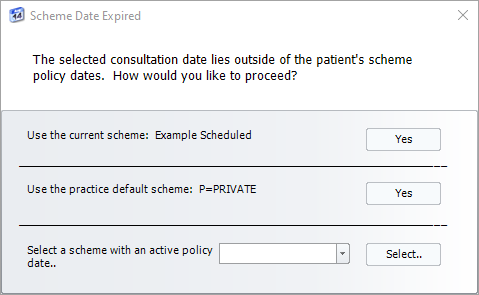
When "Choice" is selected and the invoice page is opened for a customer whose default third party has expired a message will appear asking which policy should be used. An example of this message is shown below.
Quiet
When "Quiet" is selected once the policy end date it reached it will change to the practice default without telling the user.
Related Articles
Updating a Customers Third Party References
This article will explain how to use the different options available on the Third Party References page. In MediBooks customers and businesses can be associated with any number of third parties for insurance purposes, and a default third party can be ...Changing Customer Communication Preferences
With version 7.27 of MediBooks it is now possible to send online payment requests to customers. To send payment requests to a customer first, their contact details and delivery method need to be set. This can be done on an individual basis by editing ...Changing the colour of MediBooks
You are able to customise the look and feel of MediBooks by changing the default colour settings. To do this, go to the [Home] Tab. An image of the home tab. Click on [Modify Appearance]. An annotated image, showing the modify appearance button. ...Sending payment requests at the end of the month
To help limit the number of manual Payment Requests that need to be sent, they can be sent in bulk. This can be done either as part of a pre-existing statement run or as a separate process. To set up your system for use with the Bill Payment Service, ...Changing the Billing Pattern of Customers
There are a couple of ways to change the billing pattern of customers in MediBooks. The first is by changing the billing pattern of individual customers, this is useful when you only need to change the information of a few specific customers. This ...